A String -is part of the java.lang package- it needs to have a name or value and the name equals anything that is in the QUOTES!
ex: String time = "10:23 pm";
If the length() is added like -time.length()- the number of characters are counted so it would be 8 characters long
The concatenation operator for joining Strings is concat()
ex: String time = "10:23 pm";
String Sleep = "is my bed time";
String tired = time.concat( Sleep );
System.out.println (tired); //: These 4 lines will print- 10:23 is my bed time
The equals() method used in strings compares two strings and it will only come out true if they are EXACTLY the same. So String time and Sleep would be false.
The startsWith() and endsWith() methods compare portions of a String. If there are multiple Strings and someone wants to know how many of those strings have a certain character in the beginning or end of the string this method could be used to point out those characteristics.
Substring() method can pull out a portion of a string
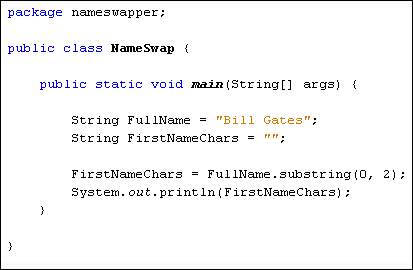

indexOf() gives the integer the a character location
charAt() gives prints character at the location you give it
trim() method is used to get ride of extra whitespace from the beginning and end of the String ONLY so the spaces will still be there
ex: String breakfast = " Eggs, Beacon,toast ";
breakfast = breakfast.trim();
System.out.println(breakfast); //*This prints -Eggs, Beacon,toast- without the trim() it would print - Eggs, Beacon,toast -
replace() method replaces whatever character you tell it to be replaced with
ex:String name = lilia sagan ;
name = name.replace( ‘l’ , ‘m’ ) ;
System.out.println(name); //* It prints mimia sagan
isEmpty() method can be used to see if a String has no characters. It will return true if the String is empty, otherwise it will return false.
ex: String nothing = "";
System.out.println(nothing); //* This will show you nothing but space or it will come out true if you ask for a true/false statement

No comments:
Post a Comment